

Overview
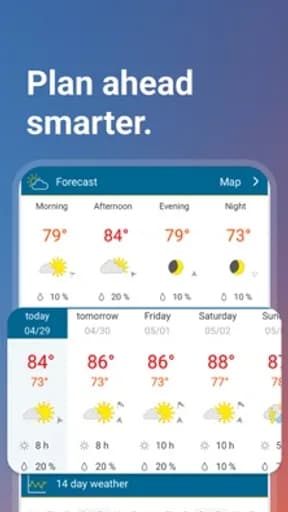
Weather & Radar is a weather app published by WetterOnline, and it exists to handle forecasts, radar, and severe-weather alerts. That framing matters more than any feature list: the useful question is not how much this app can do, but whether it does that one job in a way you can rely on when you are distracted, in a hurry, or on a poor connection.
What follows separates what the store record shows from what is editorial judgement, so you can weigh the two differently.
Forecast source, alert timing, and confidence
What matters in Weather is narrower than a feature list suggests, and it is where Weather & Radar should be measured first. Weather apps mostly resell the same underlying models. The differences that matter are which source is used for your region, how often it refreshes, and whether the app admits uncertainty rather than showing a single confident number.
Alerting is the part with real consequences. An alert that arrives late, or that covers too wide an area to be actionable, trains people to ignore the next one.
What the rating actually tells you
Its 4.7 average sits at the top of what mobile software realistically achieves. Scores in this range usually indicate that the core task works reliably and that updates have not disrupted long-standing behaviour.
Store rating counts for Weather & Radar are not recorded in this catalogue, so treat the average as a directional signal and check the current figure on the official listing.
How it compares within Weather
At 4.7, Weather & Radar rates 0.1 above the Weather median of 4.6 in this catalogue, ranking 2nd of 8. The category leader on rating is MyRadar Weather Radar, which is the most direct comparison worth making before settling on this one.
On audience size, The Weather Channel - Radar leads the category with roughly 3.6M ratings. A smaller audience is not a defect — it often accompanies a more specific design — but it does mean fewer edge cases have been found by other people first.
Permissions, data, and account requirements
Precise location is requested for local forecasts, and some apps request background location for alerts — a continuous location trail. Free weather apps are commonly ad-supported and location-rich.
This is a category where the privacy disclosure is worth more of your attention than the feature list. Check what is collected, how long it is kept, and whether it is shared with parties you have no relationship with before the account is created rather than after.
Availability across stores
Weather & Radar is listed on both Google Play and the App Store. Cross-platform availability is convenient, but feature parity is not guaranteed — release timing, platform-specific features, and pricing frequently differ between the two versions.
Notifications and attention
Notification defaults are set to maximise engagement, not usefulness, and Weather & Radar is unlikely to be an exception. The first thing worth doing after installation is opening the notification settings and turning off everything that is not time-sensitive.
The signal to watch for is whether Weather & Radar separates categories of notification or offers a single on-off switch. Fine-grained control is a reasonable proxy for whether the developer expects you to stay in control of the relationship.
Updates and long-term maintenance
Update cadence is the most useful maintenance signal available on a store listing. Check the last-updated date on the official page: a long gap in an actively-used category usually means the product is in maintenance rather than development.
The other side of frequent updates is disruption. Interface changes arrive without warning and cannot be declined, which is worth weighing before something becomes load-bearing in your routine.
Behaviour on a poor connection
Mobile software is used in lifts, on trains, and in buildings with unreliable signal, and that is where design quality becomes obvious. The question for Weather & Radar is what remains usable when the connection degrades rather than disappears entirely — a partial connection produces worse failures than no connection at all.
The behaviour worth checking specifically is whether an action you have already taken survives. Losing a half-completed form, a queued message, or an unsaved change to a dropped connection is the failure people remember, and it is entirely preventable.
How to evaluate it yourself
Compare a week of forecasts against what actually happened, and check whether alerts can be narrowed to a specific location rather than a whole region.
Do this while you can still walk away easily. The cost of switching rises quickly once an account, a library, or a month of history is involved.
Verdict
Weather & Radar suits people who need alerts they can act on rather than a decorative widget. The rating supports that, though the store listing remains the authority on current pricing, permissions, and regional availability.
Try it without paying, prune the notifications immediately, and check one alternative before your data starts accumulating here.
Highlights
- Named forecast source and refresh interval
- Alerts narrowable to a specific location
- Honest presentation of uncertainty
- Rated 4.7 on Google Play
Limitations
- Background location may run continuously
- Alert areas can be too broad to act on
- Model accuracy varies by region
Frequently Asked Questions
What is Weather & Radar used for?
Weather & Radar is a weather app from WetterOnline, intended for forecasts, radar, and severe-weather alerts. Forecast source, alert timing, and confidence is the part of the experience that most affects whether it works for you day to day.
Is Weather & Radar free?
Pricing, subscriptions, and in-app purchases vary by country and release, and can change between versions. Open the official store listing from this page to confirm the current terms before installing.
What permissions does Weather & Radar need?
Precise location is requested for local forecasts, and some apps request background location for alerts — a continuous location trail. Free weather apps are commonly ad-supported and location-rich. The store listing carries the authoritative, current permission list for your region.
Where can I download Weather & Radar?
This page links only to verified official listings — Google Play and the Apple App Store. Find Good Apps does not host or distribute application files.
How should I test Weather & Radar before relying on it?
Compare a week of forecasts against what actually happened, and check whether alerts can be narrowed to a specific location rather than a whole region.
Does Find Good Apps develop Weather & Radar?
No. Find Good Apps is an independent publication operated by Sophon LLC. It is not the developer, publisher, or distributor of Weather & Radar, and has no commercial relationship with WetterOnline.