




Overview
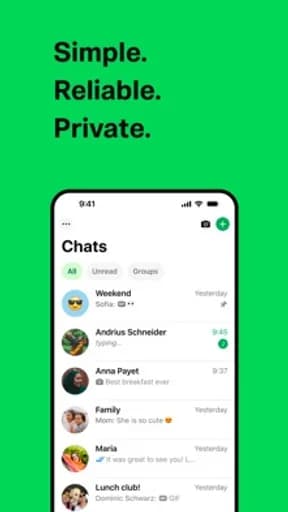
WhatsApp Messenger is a communication app published by WhatsApp LLC, and it exists to handle messaging, calling, and staying in contact. That framing matters more than any feature list: the useful question is not how much this app can do, but whether it does that one job in a way you can rely on when you are distracted, in a hurry, or on a poor connection.
This review works from what can be verified — the store listing, the category it competes in, and the rating it has accumulated — and is explicit about where judgement replaces fact.
Encryption, backups, and the contact graph
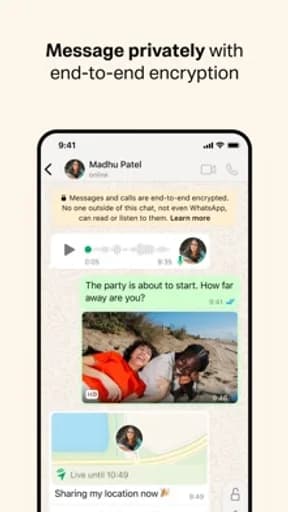
WhatsApp Messenger competes in Communication, and that category has its own recurring failure modes worth naming before anything else. The security claim in a messaging app is easy to state and hard to verify. What you can check is scope: whether encryption covers group chats, calls, backups, and metadata, or only one-to-one text — the difference is substantial and rarely advertised.
Backups are where most of the practical risk sits. A cloud backup can sit outside the encrypted channel entirely, which means the copy in the cloud may be readable even when the conversation was not.
What the rating actually tells you
Its 4.7 average sits at the top of what mobile software realistically achieves. Scores in this range usually indicate that the core task works reliably and that updates have not disrupted long-standing behaviour.
Store rating counts for WhatsApp Messenger are not recorded in this catalogue, so treat the average as a directional signal and check the current figure on the official listing.
How it compares within Communication
At 4.7, WhatsApp Messenger rates 0.3 above the Communication median of 4.4 in this catalogue, ranking 1st of 11. Nothing else in the category rates higher here, though a leading average says more about meeting expectations than about depth of features.
Permissions, data, and account requirements
Contact list access is usually requested at setup and often uploaded to match users. Message content, backup location, and metadata retention are separate questions and deserve separate answers.
Because of what this category handles, the permission list deserves reading in full rather than accepting at the first prompt. Grant what the feature you actually want requires, decline the rest, and revisit the list after a few weeks — apps commonly request more over time.
Availability across stores
WhatsApp Messenger is listed on both Google Play and the App Store. Cross-platform availability is convenient, but feature parity is not guaranteed — release timing, platform-specific features, and pricing frequently differ between the two versions.
One detail worth noting: Google Play files it under Communication, while the App Store lists it under Social Networking. That kind of split usually means the app sits between two use cases, and it is a useful hint about which audience each store thinks it is for.
Notifications and attention
Most of what WhatsApp Messenger will send you by default exists to bring you back rather than to tell you something. Pruning that on day one is the difference between a useful tool and another source of interruption.
The signal to watch for is whether WhatsApp Messenger separates categories of notification or offers a single on-off switch. Fine-grained control is a reasonable proxy for whether the developer expects you to stay in control of the relationship.
Updates and long-term maintenance
Update cadence is the most useful maintenance signal available on a store listing. Check the last-updated date on the official page: a long gap in an actively-used category usually means the product is in maintenance rather than development.
Frequent updates are not automatically good either. A redesign can remove a workflow you depend on, and in mobile software there is rarely a way back to the previous version.
Behaviour on a poor connection
A weak signal is harder on an app than no signal. Watch how WhatsApp Messenger behaves at one or two bars: whether it shows stale content honestly, retries quietly, or leaves you looking at a spinner with no way to cancel.
The behaviour worth checking specifically is whether an action you have already taken survives. Losing a half-completed form, a queued message, or an unsaved change to a dropped connection is the failure people remember, and it is entirely preventable.
How to evaluate it yourself
Read the backup settings before the privacy policy. Then check what happens to message history when you move to a new device — that migration path tells you where your messages actually live.
It is worth doing deliberately rather than waiting to find out. The failure modes in this category are predictable, which makes them cheap to check for.
Verdict
WhatsApp Messenger suits anyone who wants to understand where their conversation history is actually stored. The rating supports that, though the store listing remains the authority on current pricing, permissions, and regional availability.
Start with the free tier, review the notification defaults on day one, and give one competitor a fair trial before you build a habit around this one.
Highlights
- Encryption scope stated plainly
- Message history that survives a device change
- Notifications that respect quiet hours
- Rated 4.7 on Google Play
Limitations
- Cloud backups may sit outside end-to-end encryption
- Contact upload is often required to find people
- Metadata retention differs from message retention
Frequently Asked Questions
What is WhatsApp Messenger used for?
WhatsApp Messenger is a communication app from WhatsApp LLC, intended for messaging, calling, and staying in contact. Encryption, backups, and the contact graph is the part of the experience that most affects whether it works for you day to day.
Is WhatsApp Messenger free?
Pricing, subscriptions, and in-app purchases vary by country and release, and can change between versions. Open the official store listing from this page to confirm the current terms before installing.
What permissions does WhatsApp Messenger need?
Contact list access is usually requested at setup and often uploaded to match users. Message content, backup location, and metadata retention are separate questions and deserve separate answers. The store listing carries the authoritative, current permission list for your region.
Where can I download WhatsApp Messenger?
This page links only to verified official listings — Google Play and the Apple App Store. Find Good Apps does not host or distribute application files.
How should I test WhatsApp Messenger before relying on it?
Read the backup settings before the privacy policy. Then check what happens to message history when you move to a new device — that migration path tells you where your messages actually live.
Does Find Good Apps develop WhatsApp Messenger?
No. Find Good Apps is an independent publication operated by Sophon LLC. It is not the developer, publisher, or distributor of WhatsApp Messenger, and has no commercial relationship with WhatsApp LLC.