

Overview
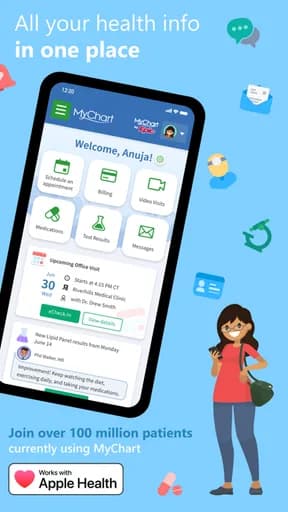
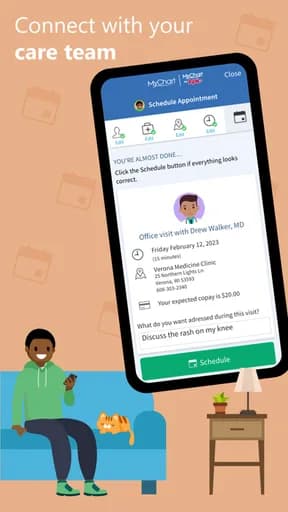
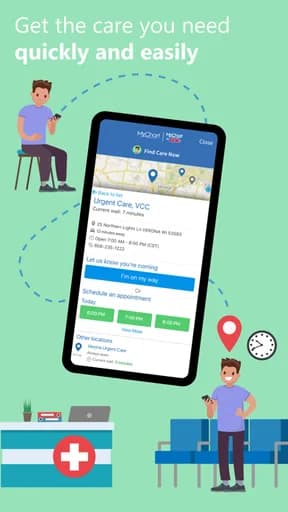
MyChart is a medical app published by Epic Systems Corporation, and it exists to handle health records, symptom information, and clinical tools. That framing matters more than any feature list: the useful question is not how much this app can do, but whether it does that one job in a way you can rely on when you are distracted, in a hurry, or on a poor connection.
This review works from what can be verified — the store listing, the category it competes in, and the rating it has accumulated — and is explicit about where judgement replaces fact.
Clinical scope and the limits of the advice
MyChart competes in Medical, and that category has its own recurring failure modes worth naming before anything else. The most important thing an app in this category can do is state what it is not. Reference material, symptom triage, and a connection to your actual medical record are three different products, and conflating them is how people end up acting on the wrong information.
Where an app connects to a real provider, availability is bounded by that provider's network and country. Where it does not, everything it says is general information, however confident the presentation.
What the rating actually tells you
Its 4.6 average sits at the top of what mobile software realistically achieves. Scores in this range usually indicate that the core task works reliably and that updates have not disrupted long-standing behaviour.
Store rating counts for MyChart are not recorded in this catalogue, so treat the average as a directional signal and check the current figure on the official listing.
How it compares within Medical
MyChart rates almost exactly at the Medical median of 4.6, placing it 4th of the 8 medical titles tracked here. The category leader on rating is Flo Ovulation & Period Tracker, which is the most direct comparison worth making before settling on this one.
On audience size, Flo Ovulation & Period Tracker leads the category with roughly 5.1M ratings. A smaller audience is not a defect — it often accompanies a more specific design — but it does mean fewer edge cases have been found by other people first.
Permissions, data, and account requirements
Health information receives heightened protection in most jurisdictions. Check the retention period, whether data is shared with insurers or employers, and whether the app falls under health-specific regulation at all — many do not.
Because of what this category handles, the permission list deserves reading in full rather than accepting at the first prompt. Grant what the feature you actually want requires, decline the rest, and revisit the list after a few weeks — apps commonly request more over time.
Availability across stores
MyChart is listed on both Google Play and the App Store. Cross-platform availability is convenient, but feature parity is not guaranteed — release timing, platform-specific features, and pricing frequently differ between the two versions.
The developer behind it
MyChart is published by Epic Systems Corporation. A developer's other listings are a useful and underused signal: a catalogue of one carefully maintained product reads very differently from dozens of near-identical titles, and the store makes that easy to check in a few seconds.
Also worth checking is whether the developer responds to store reviews. Responses are not proof of quality, but sustained silence on a page of specific, repeated complaints tells you something about how support is likely to go.
Notifications and attention
Most of what MyChart will send you by default exists to bring you back rather than to tell you something. Pruning that on day one is the difference between a useful tool and another source of interruption.
The signal to watch for is whether MyChart separates categories of notification or offers a single on-off switch. Fine-grained control is a reasonable proxy for whether the developer expects you to stay in control of the relationship.
Updates and long-term maintenance
Update cadence is the most useful maintenance signal available on a store listing. Check the last-updated date on the official page: a long gap in an actively-used category usually means the product is in maintenance rather than development.
Frequent updates are not automatically good either. A redesign can remove a workflow you depend on, and in mobile software there is rarely a way back to the previous version.
How to evaluate it yourself
Find the disclaimer before the features. If the app cannot tell you plainly whether it is reference material or clinical care, treat it as reference material.
Do this while you can still walk away easily. The cost of switching rises quickly once an account, a library, or a month of history is involved.
Verdict
MyChart suits patients tracking their own care, provided the scope statement is read first. The rating supports that, though the store listing remains the authority on current pricing, permissions, and regional availability.
Start with the free tier, review the notification defaults on day one, and give one competitor a fair trial before you build a habit around this one.
Highlights
- Clear statement of clinical scope
- Records that can be exported and shared with a clinician
- Sources cited for reference content
- Rated 4.6 on Google Play
Limitations
- General information is easily mistaken for advice
- Provider connections are limited by network and country
- Not every health app falls under health-data regulation
Frequently Asked Questions
What is MyChart used for?
MyChart is a medical app from Epic Systems Corporation, intended for health records, symptom information, and clinical tools. Clinical scope and the limits of the advice is the part of the experience that most affects whether it works for you day to day.
Is MyChart free?
Pricing, subscriptions, and in-app purchases vary by country and release, and can change between versions. Open the official store listing from this page to confirm the current terms before installing.
What permissions does MyChart need?
Health information receives heightened protection in most jurisdictions. Check the retention period, whether data is shared with insurers or employers, and whether the app falls under health-specific regulation at all — many do not. The store listing carries the authoritative, current permission list for your region.
Where can I download MyChart?
This page links only to verified official listings — Google Play and the Apple App Store. Find Good Apps does not host or distribute application files.
How should I test MyChart before relying on it?
Find the disclaimer before the features. If the app cannot tell you plainly whether it is reference material or clinical care, treat it as reference material.
Does Find Good Apps develop MyChart?
No. Find Good Apps is an independent publication operated by Sophon LLC. It is not the developer, publisher, or distributor of MyChart, and has no commercial relationship with Epic Systems Corporation.